Contents
Quick answer: the best Obsidian alternatives with AI
Obsidian is a local Markdown notes app with a large plugin ecosystem. People look for an alternative when sync costs extra ($4 a month), plugins take setup time, or AI answers never become notes they can keep editing.
The best pick depends on what you need. For free sync and AI chats that become editable notes on long projects, try Corvio. For linked personal notes, try Capacities. For an all-in-one workspace, try Notion. For tag-based outlines, try Tana Outliner. For free local files, try Logseq. For quick notes your AI finds later, try Mem.
| Tool | Best for | Built-in AI | Free sync | Starting price | Ideal user |
|---|---|---|---|---|---|
| Corvio | A notes app you share with your AI: chats become organized notes | Yes, plus MCP for your own AI | Yes | Free; Team plan | People who chat with AI about work or study daily and revisit their notes |
| Capacities | Notes as linked objects | Pro only | Yes | Free; Pro $9.99/mo | People who think in people, books, and ideas |
| Notion | All-in-one workspace | Trial on Free; paid | Yes | Free; Plus $10/mo | Docs, databases, and teams |
| Tana Outliner | Outlines with supertags | Yes, credit-based | Yes | Free; Plus $8/mo | People who like building structure |
| Logseq | Open-source outliner, local files | No | No | Free | People who want files on their own disk |
| Mem | Jot now, AI finds later | Yes; Free = 25 new notes/mo | Yes | Free; Plus $9/mo | Quick note-jotters |
How we tested
We used the same four checks in every app, and explained each product's own idea in plain words before judging it. Prices are marked "(from site)".
| Check | In plain words |
|---|---|
| AI → editable note | Do AI answers become notes you can keep editing, without endless copy-paste? |
| Notes as knowledge base | Can an AI use your notes as background to help with new questions? |
| Works without plugins | Do tables, highlights, and basic structure work on day one? |
| Free sync | Do your devices stay in sync on the free plan? |
The 6 Obsidian alternatives we tested
1. Corvio
- Website:
- Best for:
A notes app you share with your AI.
You chat with AI every day about work or study; the useful parts land as notes you can revisit, and your AI can read those same notes next time.
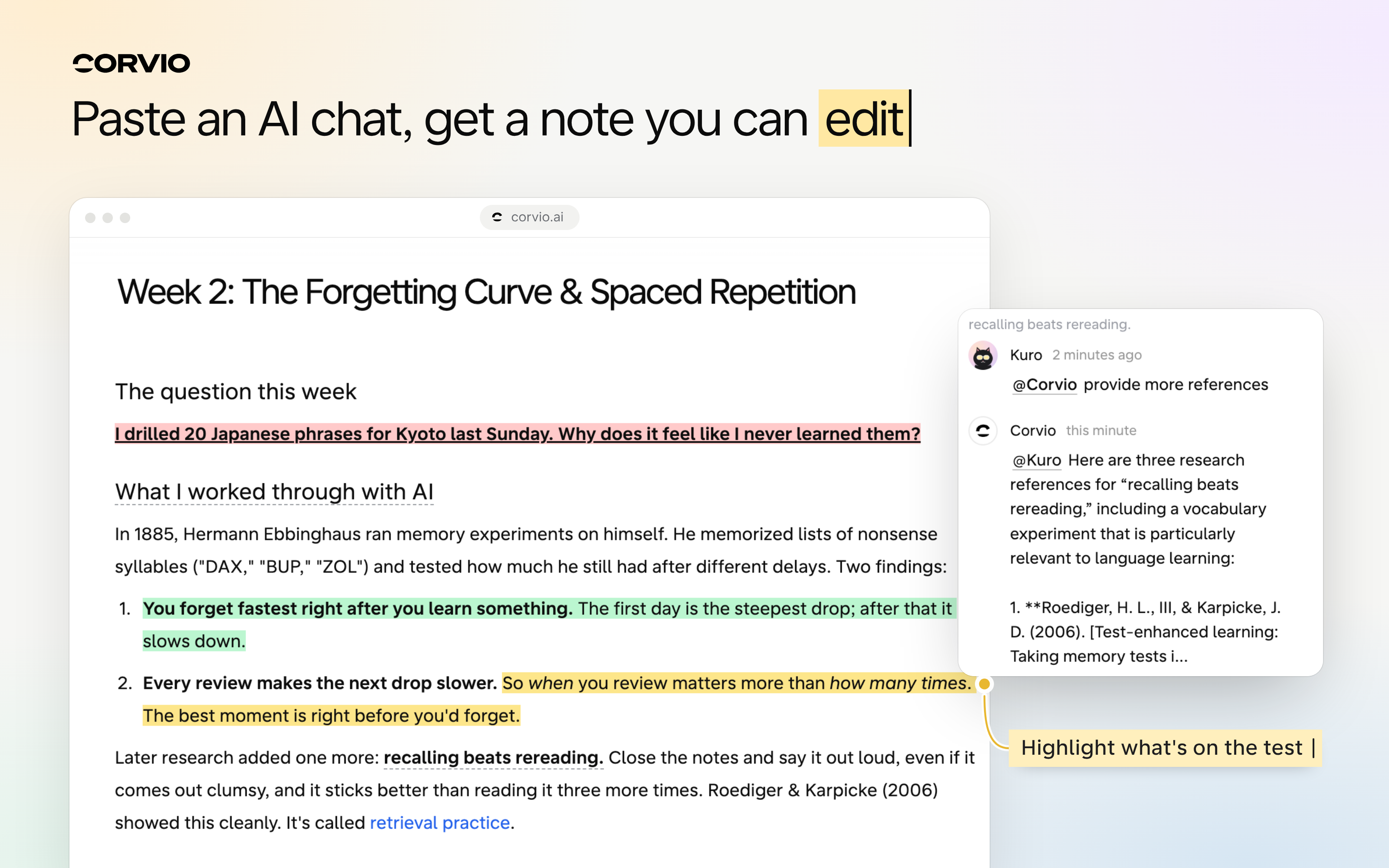
Unique idea 1: paste an AI chat, get a note you can edit. Most AI chats end up buried in a long chat history. Corvio keeps the useful part as a note. Example: a student in Cognitive Psychology asks ChatGPT to explain spaced repetition, then pastes the conversation into Corvio, asks it to organize the chat into study notes, and submits the request. Corvio turns it into a clean doc that reads like study notes, not a chat log. The student fixes a sentence, adds their own example, and highlights the line that will be on the test. Before the exam, they review that doc instead of scrolling through old chats.
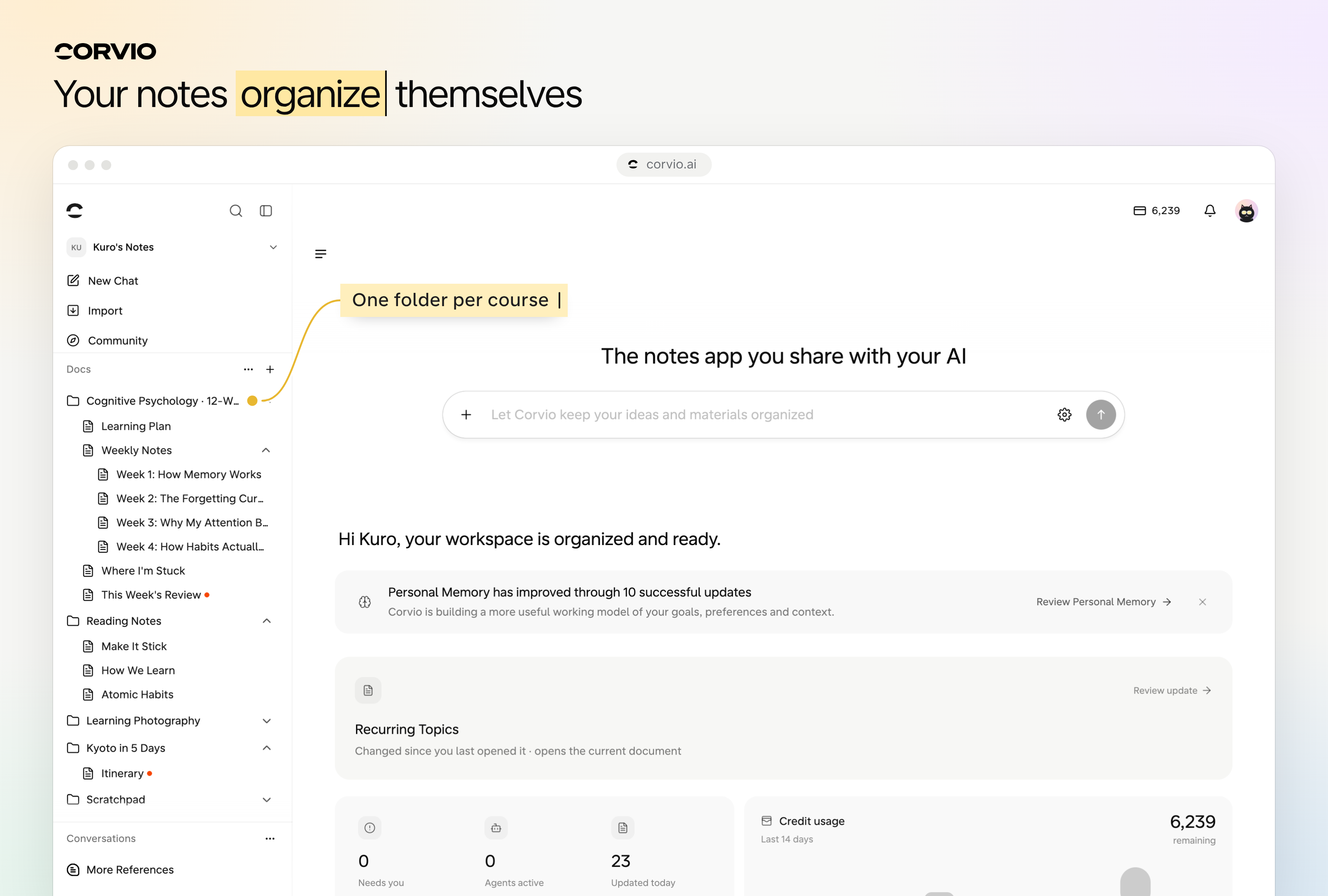
Unique idea 2: your notes organize themselves. A week later the student pastes a chat about retrieval practice into Corvio, asks it to organize the chat into study notes, and submits the request. They do not have to pick a place: Corvio's note agent puts it in the Cognitive Psychology folder, adding it to an existing doc if it fits or making a new doc next to it. Each course gets its own folder. To rearrange things yourself, tell Corvio's built-in AI in plain words, like "make a folder for my cog psych class."
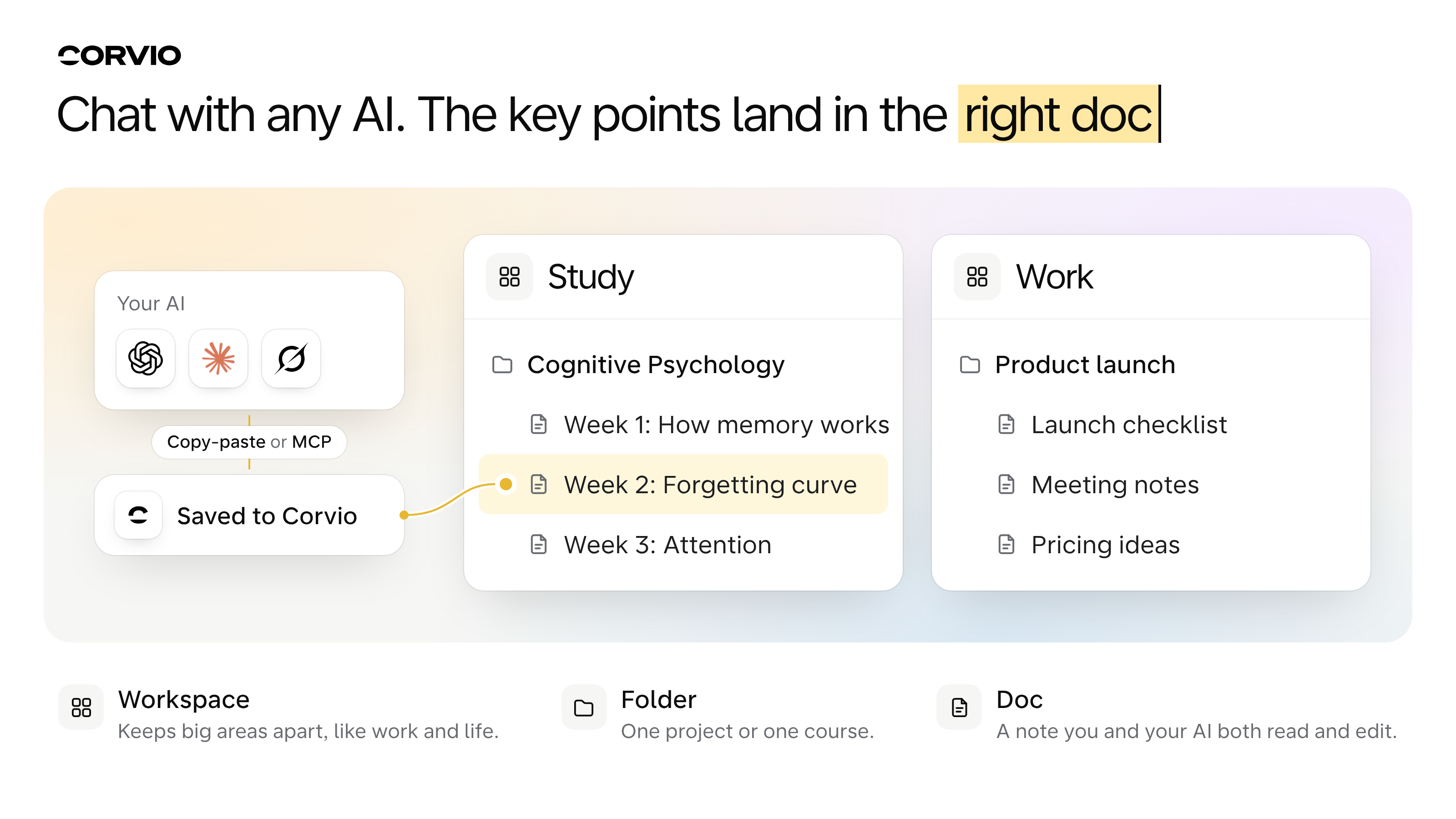
Unique idea 3 (Advanced): your own AIs save to the same notes. Instead of pasting, connect your AI to Corvio over MCP or CLI. MCP is a standard way for AI apps to connect to other tools. Send Corvio's MCP setup guide to an AI tool that supports MCP, then follow that tool's connection steps and complete Corvio authorization. Once connected, tell Claude, ChatGPT, Codex, Muse, or Grok Bot to save to Corvio, and the note lands in the right folder. Several AIs can read and write the same notes. Example: in the screenshot above, Grok Bot, connected over MCP, left a comment on the note that came from Claude's answer.
Pricing (from site): Free $0 (refills up to 6,000 credits monthly, sync included); Team plan available. See Corvio pricing.
How it scores
- AI → editable note: Strong. Paste a chat, or connect over MCP or CLI, to save AI answers as editable docs.
- Notes as knowledge base: A connected AI can use your notes as background, so the next chat starts from what you already have.
- Out of the box: Highlights, comments, tables with dropdowns, Excel viewing and editing, image resize, and edit history work on day one. No plugins to hunt for.
- Free sync: Yes, on Free. Notes open in any browser.
Pick when
You talk with AI about work or study every day and want the useful parts to stick as notes you keep coming back to.
Skip when
You want one app for docs, databases, and calendar. Notion is built for that.
Read more: Corvio as an Obsidian alternative
2. Capacities
- Website:
- Best for:
Personal notes as linked objects, not folders of files.
Unique idea 1: every note has a type. You don't drop notes into folders—you label what each one is, like a Page, a Person, or a Book. Same types group themselves. Example: a Book called How to Take Smart Notes shows up under Books in the sidebar, without you making a Books folder.
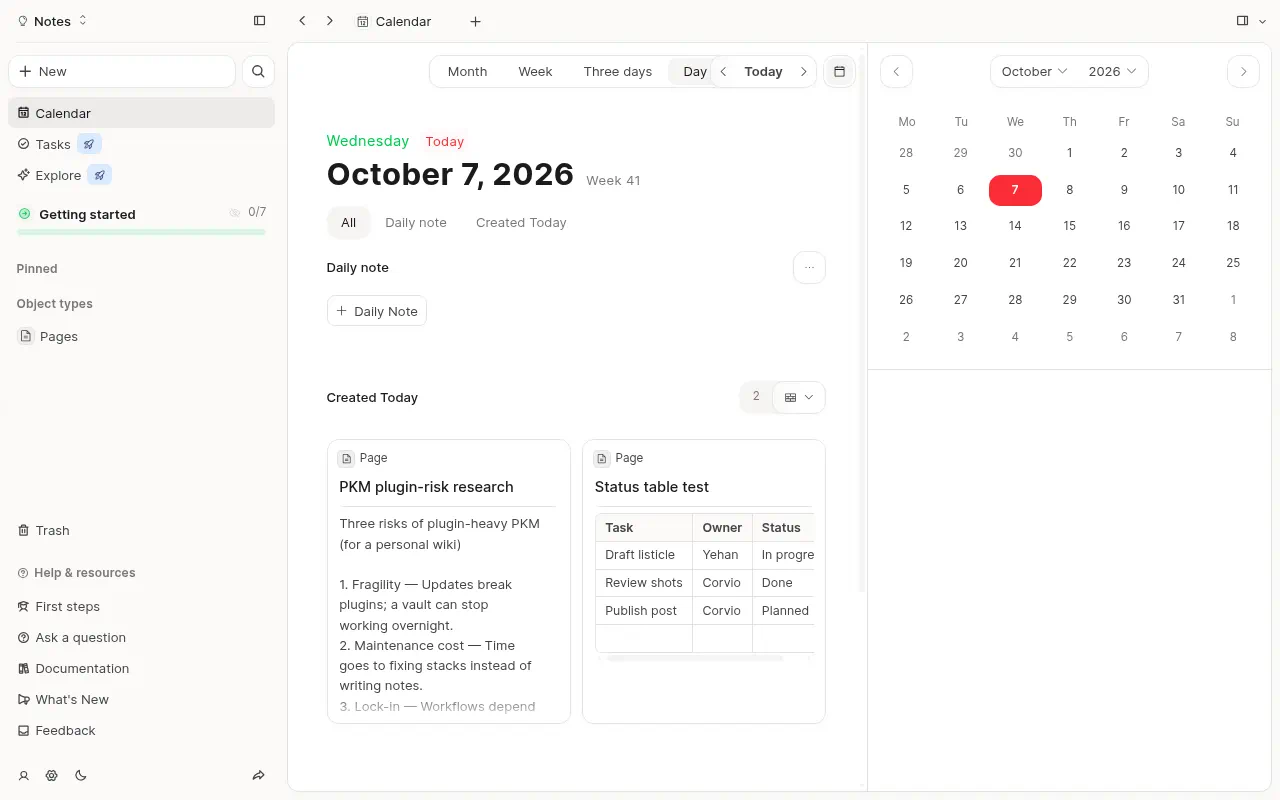
Unique idea 2: links work both ways. Mention Ada in your PKM plugin-risk research Page, and that Page appears as a backlink when you open Ada.
Pricing (from site): Free with sync; Pro $9.99/mo yearly or $11.99 monthly.
How it scores
- AI → editable note: Paste on Free. Built-in AI is Pro only.
- Notes as knowledge base: Pro's AI can chat over your notes.
- Out of the box: Ready on day one;
/tableworks without plugins. - Free sync: Yes, all devices.
Pick when
You think in people, books, and projects.
Skip when
You want AI chats saved as notes on the free plan.
3. Notion
- Website:
- Best for:
All-in-one workspace (docs, databases, and more). Heavy if you only need notes.
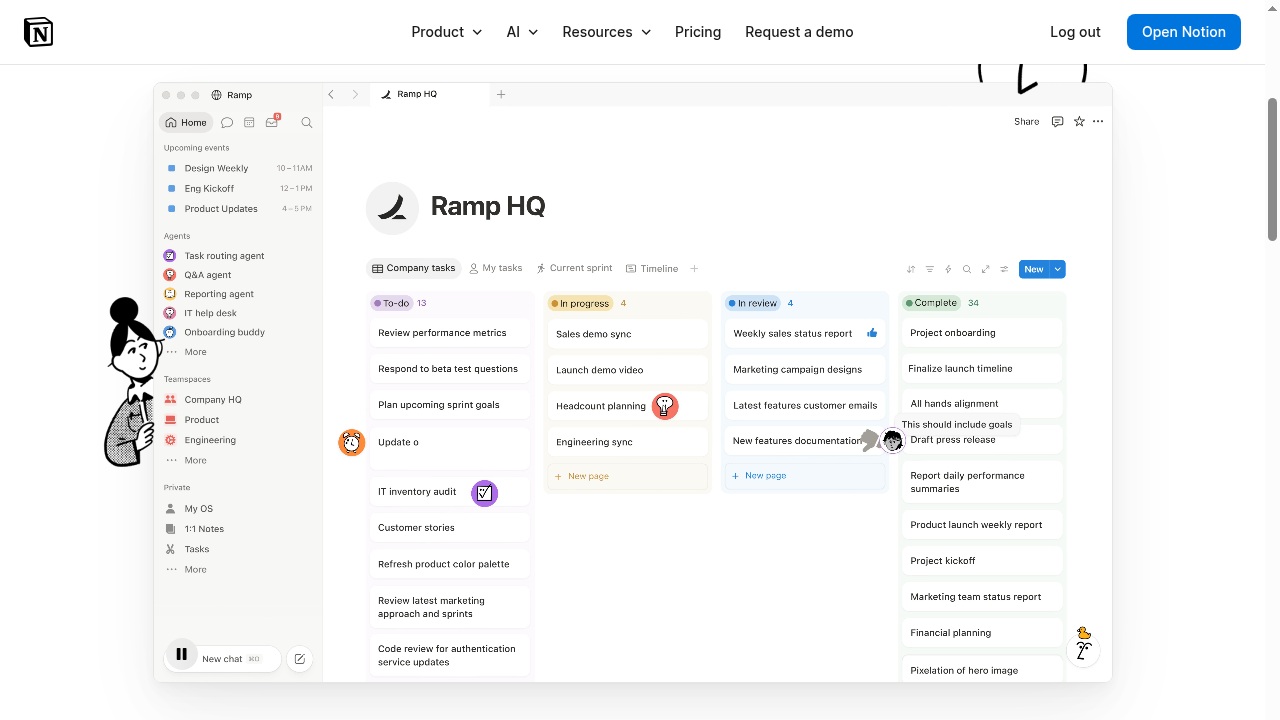
Unique idea 1: databases, not just pages. A list can become a table: each row opens as a full page, and columns hold things like Status or Owner. Example: a To-Do table with a Status column you can sort and filter.
Unique idea 2: everything in one workspace. Docs, databases, calendar, and team pages share one sidebar and one search. That breadth is the point, and also why it can feel like a lot for simple notes.
Pricing (from site): Free; Plus $10/member/mo; Business $20/member/mo.
How it scores
- AI → editable note: Paste works; Notion also has an official MCP server that lets ChatGPT, Claude, and Codex create pages.
- Notes as knowledge base: Notion AI works across your workspace on paid plans.
- Out of the box: Very complete, no plugins.
- Free sync: Yes, with native apps.
Pick when
You want one workspace for docs, databases, calendar, and team projects.
Skip when
You only need a simple place to keep key AI chats.
4. Tana Outliner
- Website:
- Best for:
Nested outline notes with reusable tags (supertags).
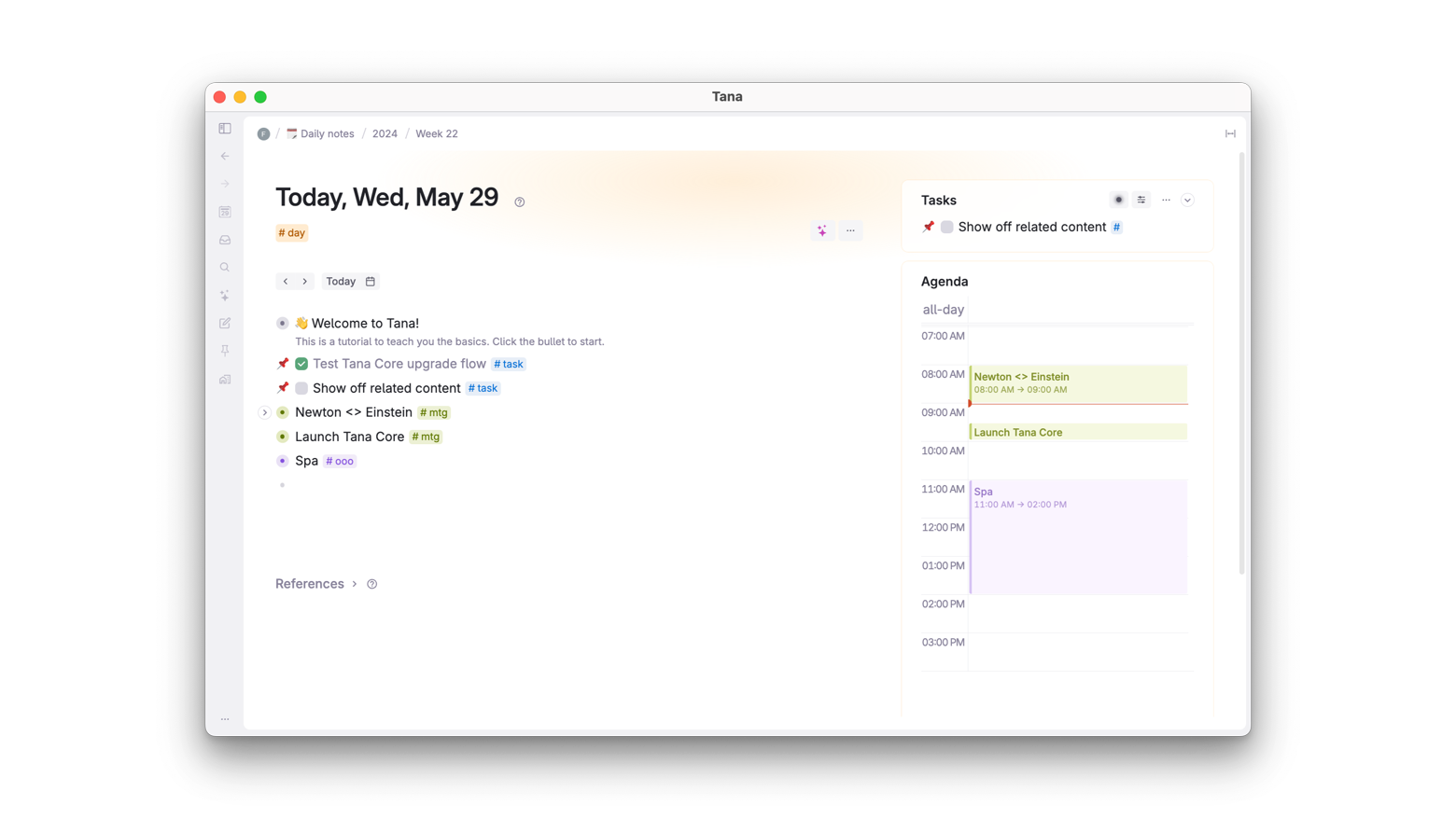
Unique idea: tag similar lines so they share one format (supertags). Tana is an outliner—every line can nest. Tag a line #book and it gets Author and Status fields, so every book is recorded the same way. You set the format once; writing later is easier.
Pricing (from site): Free (500 AI credits/mo); Plus from $8/mo; students 50% off.
How it scores
- AI → editable note: Free local MCP while the desktop app is open; remote MCP is a paid beta.
- Notes as knowledge base: Inline AI chat, using credits.
- Out of the box: Tasks and live searches built in; you build supertags first.
- Free sync: Yes.
Pick when
You enjoy designing tags and fields before capturing.
Skip when
You want zero setup today.
5. Logseq
- Website:
- Best for:
Free open-source outliner with notes as local files.
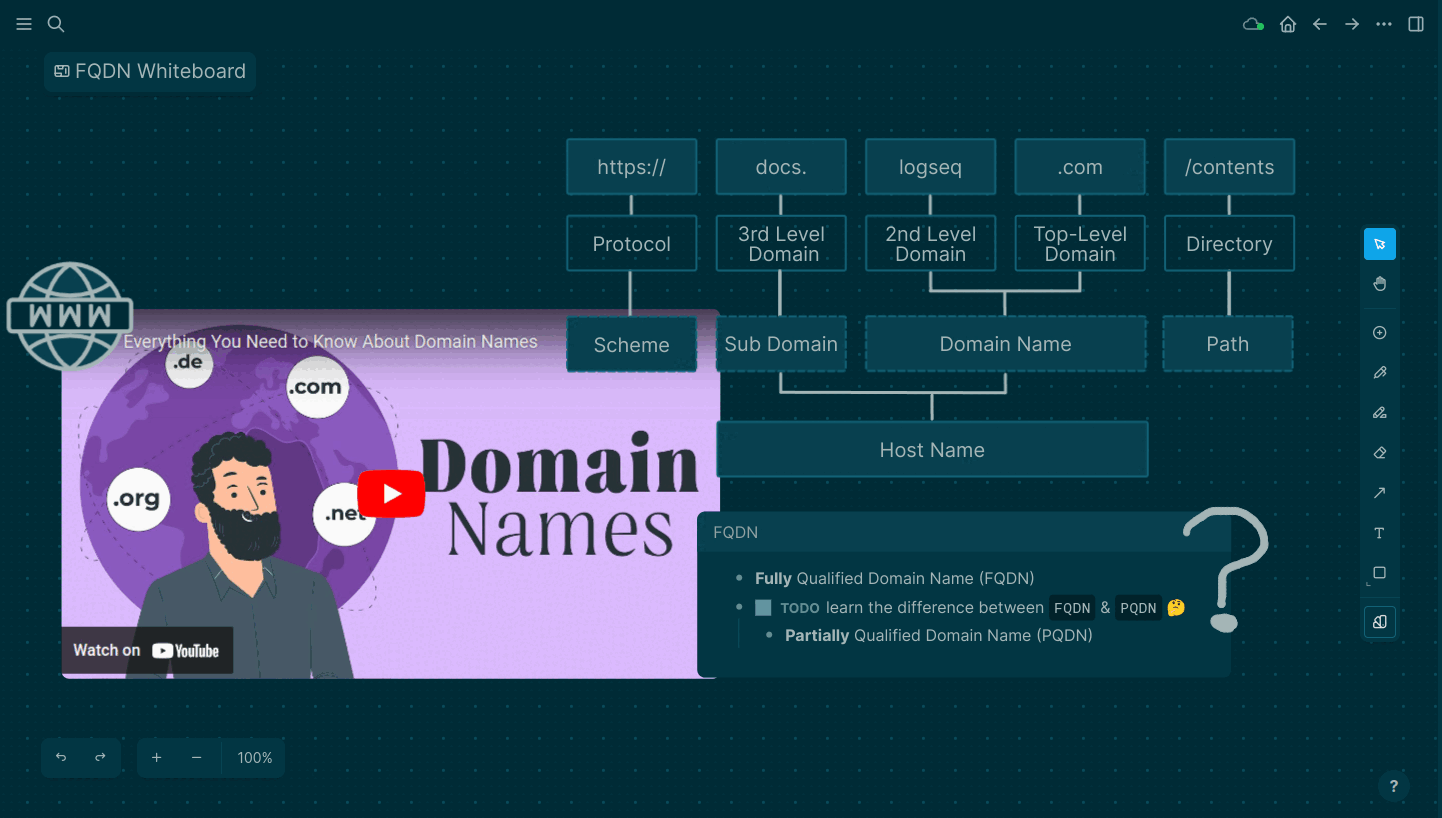
Unique idea: write by day; anything you mention links back. Logseq opens to today's journal. Example: write "Met Jessica, she's reading [[Intertwingled]]" today, and that line later shows up on the Intertwingled page under Linked References—no filing needed.
Pricing (from site): Free and open-source; official Sync via $5 or $15/mo donation; Pro announced, price TBD.
How it scores
- AI → editable note: Through community plugins.
- Notes as knowledge base: Linked References and queries; AI via plugins.
- Out of the box: Tasks, PDF notes, flashcards built in; more via plugins.
- Free sync: No; DIY with Git or Syncthing, or donate for Sync.
Pick when
You want free software and files on your own disk.
Skip when
You want sync included and AI without plugins.
6. Mem
- Website:
- Best for:
Jot notes and let its built-in AI find them later (small free limits).
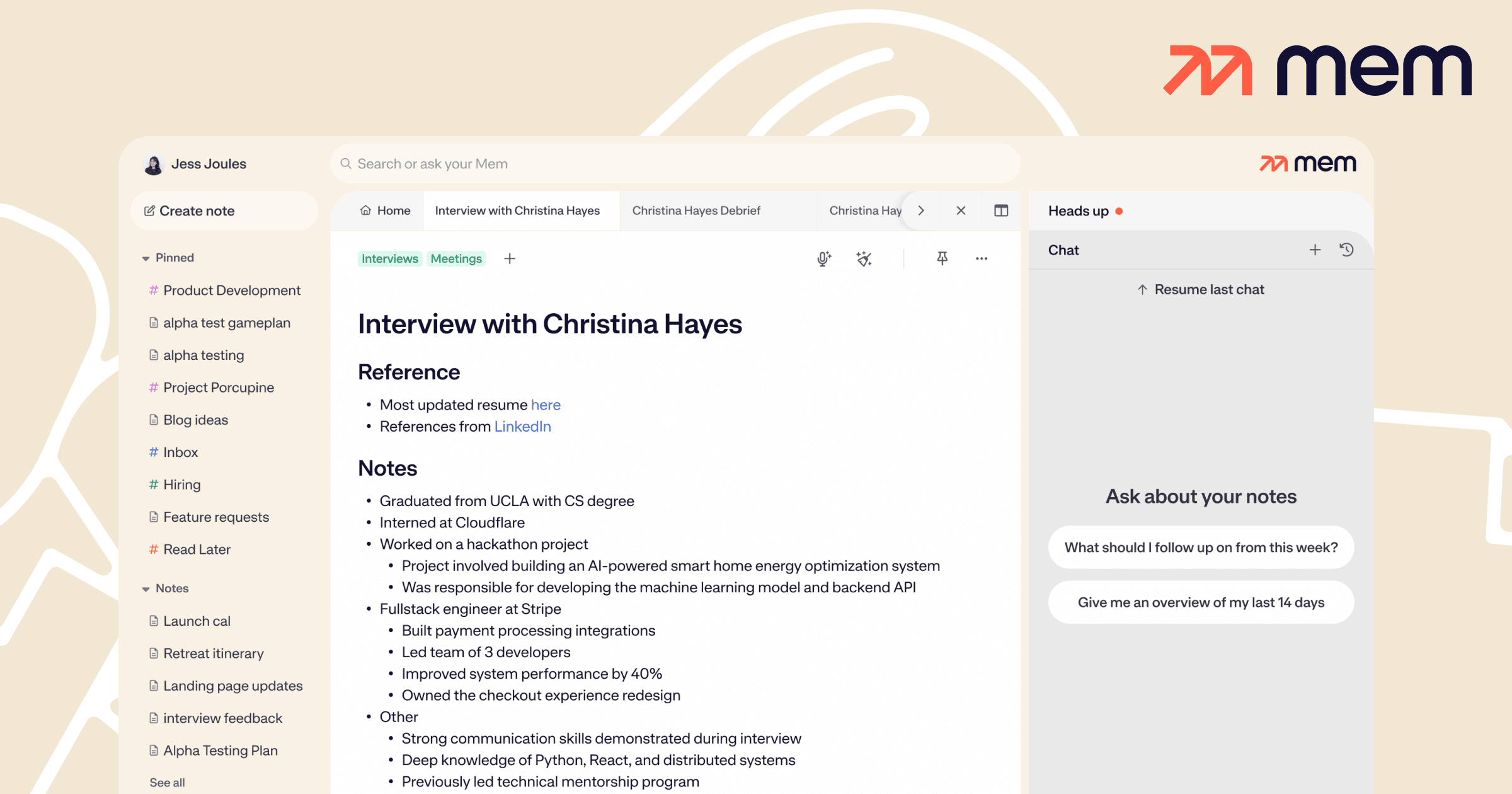
Unique idea: jot now, ask Mem later. You don't sort notes as you write. Example: type a few messy lines after a coffee chat, then weeks later ask Mem about "that meeting with the crypto expert" and it finds the note.
Pricing (from site): Free (25 new notes/mo); Plus $9/mo; Pro $29/mo.
How it scores
- AI → editable note: Official MCP (
https://mcp.mem.ai/mcp); any note created counts toward Free's 25. - Notes as knowledge base: Asking Mem about your notes is the main feature.
- Out of the box: Editor, templates, Collections, voice capture. Light structure.
- Free sync: Yes.
Pick when
You mostly drop in quick, short notes and want to find them later, and you can live with monthly caps.
Skip when
You're working on a project for weeks, like a course or a product launch, and want each AI chat to build on the last (Corvio is built for that).
Which Obsidian alternative should you pick?
- If you want notes as linked objects instead of folders, pick Capacities.
- If you want one workspace for docs, databases, calendar, and teams, pick Notion.
- If you want AI chats saved as notes for long projects you keep pushing forward, like a semester course or a product launch, pick Corvio.
- If you want nested outlines with reusable tags, pick Tana Outliner.
- If you want quick notes that built-in AI finds later, pick Mem.
- If you want a free, open-source outliner with local files, pick Logseq.
FAQ
What are the best Obsidian alternatives in 2026?
The best Obsidian alternatives in 2026 depend on what you need. For an Obsidian alternative with free sync that turns AI chats into editable notes on long projects, try Corvio. For linked personal notes, try Capacities. For an all-in-one workspace, try Notion. For tag-based outlines, try Tana Outliner. For free local files, try Logseq. For quick notes your AI finds later, try Mem.
What can I use instead of Obsidian for notes with AI?
Looking for something instead of Obsidian for notes with AI? Pick by how the AI gets in. Corvio, Mem, and Notion offer official MCP, a standard way for AI apps to connect to other tools, so ChatGPT or Claude can save notes into them. Capacities puts its AI in the paid Pro plan. Tana Outliner spends AI credits. Logseq relies on plugins.
What's the best way to save ChatGPT answers into editable notes?
The simplest way is to paste the chat into a notes app that cleans it up for you. In Corvio, paste a ChatGPT chat, ask it to organize the conversation into editable notes, and submit the request. Corvio creates a normal doc you can edit, highlight, and find again, and files it in the right folder so answers don't pile up as loose files. To skip pasting, connect ChatGPT to Corvio over MCP.
How do I connect ChatGPT or Claude to Obsidian without messy plugins?
You can use an Obsidian MCP server or plugins like Copilot, or point Claude Code at your vault folder, but each needs setup, and Restricted Mode blocks community plugins until you turn it off. Without plugins, connect ChatGPT or Claude to a notes app with official MCP, like Corvio, and keep Obsidian for your local files.
What's a notes app you share with your AI?
It's a notes app where you and your AI work in the same notes: the AI saves and reads them, and you edit them. Corvio is built for this, especially if you chat with AI daily and come back to those notes later. Paste a chat and submit a request to organize it into notes, or connect your AI over MCP; your notes sync free across your devices. Mem and Notion also offer MCP.
Is there a free Obsidian alternative with sync?
Yes. Obsidian is free, but Obsidian Sync costs $4 per user per month, billed annually (from site). Corvio, Capacities, Notion, Tana Outliner, and Mem all include sync on their free plans, and Corvio also turns AI chats into notes you can edit. Logseq is free too, but its official sync needs a monthly donation.
Obsidian vs Notion: which should I pick?
Pick Obsidian if you want notes stored as local Markdown files and don't mind adding plugins for extra features. Pick Notion if you want docs, databases, and a calendar in one workspace, with sync on the free plan. If you mainly want AI chats saved as notes you keep editing, Corvio is the lighter choice.
Put your AI work somewhere it lasts
Save the useful parts of your AI chats as documents you can edit and open on any device, without an extra Sync bill.